Redux - 非同步抓取網路資料並放到 component
Commit
安裝套件
npm install --save redux react-redux axios redux-thunk
定義取得資料的 API(jsonPlaceholder 是一個用來測試的工具網站)
src/apis/jsonPlaceholder.js
import axios from 'axios';
export default axios.create({
baseURL: 'https://jsonplaceholder.typicode.com'
});
啟用 redux thunk 來支援非同步操作
src/index.js
import React from 'react';
import ReactDOM from 'react-dom';
import App from './App';
import {createStore, applyMiddleware} from 'redux'
import { Provider } from 'react-redux'
import reducers from './reducers'
import thunk from "redux-thunk";
const store = createStore(reducers, applyMiddleware(thunk));
ReactDOM.render(
<Provider store={store} >
<App />
</Provider>,
document.getElementById('root')
);
在 action creator 裡 dispatch 抓取資料的結果
如果你覺得「() => async dispatch =>」看起來很奇怪,可以參考:https://www.isaacnote.com/2020/06/redux-shorten-async-function.html
src/actions/index.js
export const fetchPosts = () => async dispatch => {
console.log("action fetchPosts")
const response = await jsonPlaceholder.get('/posts')
dispatch({type:'FETCH_POSTS', payload: response})
}
定義 reducer 把抓取的結果設定到 state
src/reducers/index.js
export const fetchPostReducer = (fetchPosts = null, action) => {
console.log("fetchPostReducer", fetchPosts, action)
if (action.type === 'FETCH_POSTS') {
console.log("return action", action.payload.data)
return action.payload.data;
}
return fetchPosts
}
在 mount component 時抓取資料
src/components/PttPosts.js
import React, {Component} from "react";
import {connect} from 'react-redux'
import {fetchPosts, selectPttPost} from "../actions";
class PttPosts extends Component {
componentDidMount() {
console.log('fetch posts')
this.props.fetchPosts()
}
renderList() {
if (this.props.postList) {
console.log("renderList", this.props.postList)
return this.props.postList.map((post) => {
console.log("map", post)
return <div key={post.id}>
<div key={post.id}><a onClick={() => this.props.selectPttPost(post)}>Title:{post.title}</a></div>
</div>
});
} else {
return 'Loading...'
}
};
render() {
console.log('render', this.props)
return <div>{this.renderList()}</div>
}
}
const mapStateToProps = (state) => {
console.log("mapStateToProps",state)
return {postList: state.fetchPosts};
}
export default connect(mapStateToProps, { fetchPosts, selectPttPost })(PttPosts)
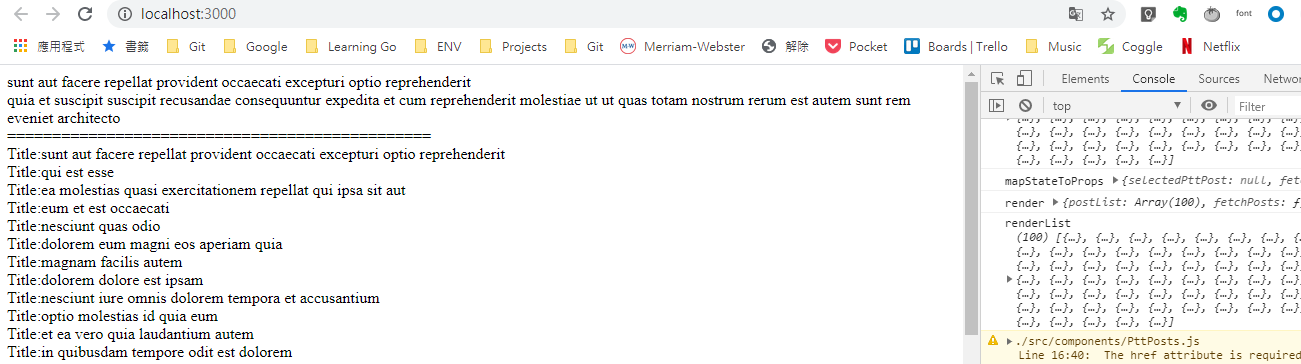
npm start 然後看結果,可以點擊項目來顯示文章
接下來看什麼
上一篇 / 下一篇
延伸閱讀